Display a customized image in ST7735
Basic of ST7735 and Arduino Nano
- https://www.electronics-lab.com/project/arduino-diy-photo-frame/
- https://learn.adafruit.com/1-8-tft-display?view=all
Prepare the image. below is my picture in JPG format
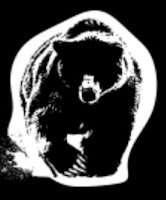


#include <SPI.h>
#include <Adafruit_GFX.h>
#include
<Adafruit_ST7735.h> // include Hardware library
#define TFT_RST
9
#define TFT_DC
8
#define TFT_SCLK
13
#define TFT_MOSI
11
Adafruit_ST7735 tft =
Adafruit_ST7735(TFT_CS, TFT_DC, TFT_RST);
// Bear Logo
const unsigned char
bearlogo [] PROGMEM = {
0x00, 0x00, 0x00,
0x00, 0x00, 0x00, 0x00, 0x00, 0x00, 0x00, 0x00, 0x00, 0x00, 0x00, 0x00,
0x00,
0x00, 0x00, 0x00,
0x00, 0x01, 0xfc, 0x00, 0x00, 0x00, 0x00, 0x07, 0xff, 0x00, 0x00, 0x00,
0x00,
0x1f, 0x3f, 0x80,
0x00, 0x00, 0x00, 0x7c, 0x07, 0xc0, 0x00, 0x00, 0x03, 0xf0, 0x01, 0xf0,
0x00,
0x00, 0x0f, 0xe0,
0x31, 0xf8, 0x00, 0x00, 0x1f, 0xe1, 0xff, 0xfc, 0x00, 0x00, 0x7f, 0xff,
0x0f,
0xfe, 0x00, 0x00,
0xfe, 0x00, 0x01, 0xff, 0x00, 0x01, 0xfe, 0x00, 0x00, 0x3f, 0x80, 0x03,
0xf6,
0x00, 0x00, 0x1f,
0xc0, 0x07, 0xef, 0x00, 0x00, 0x1f, 0xe0, 0x0f, 0x9b, 0x00, 0x00, 0x1f,
0xe0,
0x0f, 0xb2, 0x00,
0x00, 0x3f, 0xe0, 0x0f, 0xe4, 0x00, 0x00, 0x3d, 0xf0, 0x1f, 0x64, 0x00,
0x00,
0x3d, 0xf0, 0x1f,
0x40, 0x00, 0x00, 0x1c, 0xf0, 0x1f, 0xc0, 0x00, 0xc0, 0x3e, 0xf0, 0x1f,
0x40,
0x00, 0xe0, 0x30,
0xf0, 0x1f, 0x60, 0x01, 0xe0, 0x61, 0xf8, 0x1f, 0x60, 0x01, 0xf0, 0xc1,
0xf8,
0x1f, 0x60, 0x00,
0x18, 0x01, 0xf0, 0x1d, 0xc0, 0x00, 0x18, 0x01, 0xf0, 0x1d, 0x80, 0x00,
0x10,
0x01, 0xf0, 0x1d,
0x80, 0x00, 0x00, 0x01, 0xf0, 0x0c, 0x00, 0x00, 0x00, 0x01, 0xf0, 0x0f,
0x10,
0x00, 0x00, 0x01,
0xf0, 0x1f, 0x20, 0x00, 0x00, 0x03, 0xe0, 0x1f, 0x60, 0x00, 0x00, 0x03,
0xe0,
0x1f, 0xe0, 0x00,
0x00, 0x03, 0xc0, 0x1f, 0xc0, 0x00, 0x00, 0x03, 0x80, 0x3f, 0xc0, 0x00,
0x00,
0x03, 0x80, 0x3f,
0xe0, 0x00, 0x00, 0x07, 0x00, 0x3f, 0xe0, 0x1f, 0x80, 0x06, 0x00, 0x1f, 0xf8,
0x1f, 0x00, 0x06,
0x00, 0x0f, 0xfc, 0x1e, 0x00, 0x0c, 0x00, 0x07, 0xfc, 0x06, 0x00, 0x0c,
0x00,
0x07, 0xf8, 0x02,
0x00, 0x08, 0x00, 0x3f, 0xf0, 0x00, 0x00, 0x18, 0x00, 0x0f, 0xf0, 0x00,
0x00,
0x10, 0x00, 0x0f,
0xf8, 0x02, 0x00, 0x30, 0x00, 0x0f, 0xf8, 0x00, 0x00, 0x30, 0x00, 0x07,
0xfc,
0x06, 0x00, 0x70,
0x00, 0x00, 0x7e, 0x0c, 0x00, 0x70, 0x00, 0x00, 0x7e, 0xf0, 0x01, 0xf0,
0x00,
0x00, 0x01, 0xff,
0xff, 0xf0, 0x00, 0x00, 0x00, 0x7f, 0xff, 0xc0, 0x00, 0x00, 0x00, 0x00,
0x00,
0x00, 0x00, 0x00,
0x00, 0x00, 0x00, 0x00, 0x00, 0x00, 0x00, 0x00, 0x00, 0x00, 0x00, 0x00,
0x00,
0x00, 0x00, 0x00,
0x00
};
void setup() {
tft.initR(INITR_BLACKTAB);
tft.fillScreen(BACKCOLOR);
// back colour in background of ST7735
tft.setRotation(1);
//set as landscape orientation
tft.drawBitmap(110, 55, bearlogo, 47, 54, WHITE); //draw bear logo
}


Comments
Post a Comment